
Updated:
Why 1:1 notes matter
Weekly one-on-ones blur together. A manager promises to look into a promotion path, the report mentions a blocker, both agree to revisit it in two weeks, and then nobody remembers who was supposed to do what. When review season comes, the only evidence is a vague feeling that “we talked about it”.
Writing notes during a personal conversation also changes its tone. It's hard to be fully present while typing.
What Notal writes down
Pick the “One-on-one” meeting type. Alongside the summary and action items, Notal adds sections that fit a 1:1, filled in only when the topic came up:
Feedback
What was said in both directions, without softening or exaggerating it.
Goals and progress
Targets that were discussed and where things stand.
Blockers
What's slowing the person down and what was agreed about it.
Growth and career
Development topics, if they were part of the conversation.
Follow-ups
Action items with an owner, so the next 1:1 can start with “did we do what we said?”
Contradictions
If a new agreement conflicts with one from a previous 1:1, the conflict check points it out.
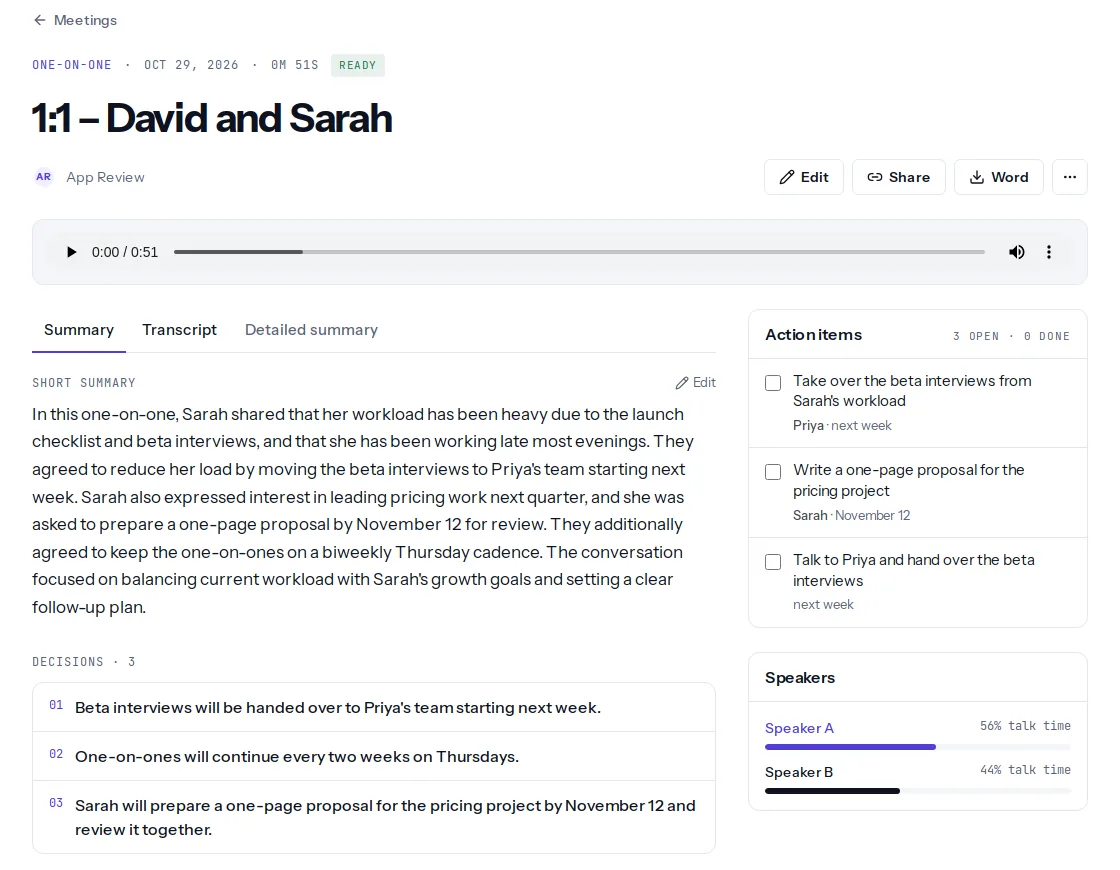
Step by step
- Agree with the other person that you'll record your 1:1s, and why. Notes that both people can read build trust; secret recordings destroy it.
- Record in the room with your phone or laptop, or in Chrome/the Windows app for remote 1:1s. Choose “One-on-one” as the type and add the other person as a participant.
- After the meeting, both of you can open the summary. Correct anything that came out wrong.
- Before the next 1:1, open the last one and go through the open action items first.
- When you prepare a review, ask Notal “what did we agree about Sarah's goals this quarter?” and check the cited meetings.
Privacy inside the workspace
A 1:1 is visible only to the person who recorded it and the participants you add. Other workspace members, including admins, don't see it in their list.
Frequently asked questions
Can workspace admins read my one-on-ones?
No. Meetings are visible only to their creator and participants. Admins can delete meetings, but they don't see 1:1s they weren't part of.
Is recording 1:1s a good idea?
It works when both people agree and both can read the notes. If either person isn't comfortable, don't record; you can still upload a short voice memo summarizing the meeting afterwards.
Can I record in-person 1:1s?
Yes. Record with your phone and upload the file, or record directly in Notal on the web. A phone on the table between you is usually enough for a clear transcript.
Does Notal work for skip-levels and mentoring sessions?
Yes. Use the same “One-on-one” type; the sections only appear when the topics were discussed.