
Updated:
The three types
Classic note apps
Notion, OneNote, Google Docs, Apple Notes and similar. Flexible and familiar, but someone has to type during the meeting.
AI note takers
Record the meeting and produce a transcript, summary and action items. Some send a bot into the call; others record from your device.
Built-in assistants
Zoom, Google Meet and Microsoft Teams offer AI summaries on some paid plans. They work only inside their own platform.
What to look for
| Criterion | Why it matters | Question to ask |
|---|---|---|
| How it captures | Bots are automatic but visible; device recording is invisible but manual | Will our clients accept a bot? Do we meet in person? |
| Languages | A transcript is only useful if your language is well supported | Is our language fully supported or in beta? |
| Decisions and action items | A summary is nice; owners and due dates are what get work done | Does it extract owners and dates? |
| Search across meetings | The value grows when you can find what was said months ago | Can I ask questions across all meetings? |
| Privacy | Meetings contain sensitive information | Who can see a meeting? Is data used for training? Can I delete it? |
| Integrations | Notes that stay in one app are often forgotten | Does it connect to our CRM, chat or task tools? |
| Pricing model | Per-seat pricing grows with the team | Per user or per workspace? What's in the free plan? |
Matching the app to the situation
- Mostly short internal meetings, and someone is happy to type: a classic note app with a shared template is enough.
- Lots of external calls on one platform, and everyone's fine with a bot: a bot-based AI note taker records everything automatically.
- In-person meetings, clients who don't want bots, or meetings in Turkish: a device-based AI note taker like Notal fits better.
- Everyone uses the same platform and its paid plan already includes AI notes: try the built-in assistant first.
Where Notal fits
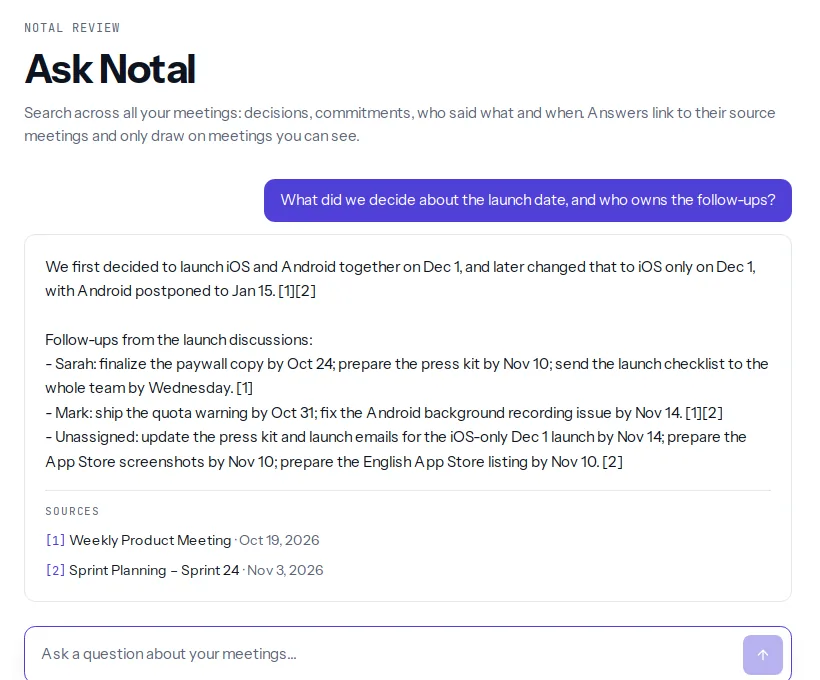
Notal is an AI note taker that records from your device (Chrome, the Windows app or your phone) or from uploaded files. It produces a transcript with speaker names, a summary, decisions and action items with owners and dates, flags decisions that contradict earlier ones, and lets you ask questions across all your meetings. It's priced per workspace. It doesn't join calls automatically, show live transcripts or record video.
For a detailed look at specific AI note takers, see our overview of the best AI meeting note takers and the comparisons with Otter and Fireflies.
Frequently asked questions
Do I still need a classic note app if I use an AI note taker?
Often yes, for agendas, planning documents and notes that aren't tied to a meeting. Many teams paste AI-generated summaries into their wiki or docs.
Are AI meeting notes accurate enough?
For most meetings with clear audio, yes, but check names, numbers and dates before you rely on them. Good tools let you jump from the summary to the transcript and audio.
Can I use an AI note taker for in-person meetings?
Device-based tools like Notal work well in person: record with a phone or laptop in the room. Bot-based tools generally only work for online calls.
What's the cheapest option for a team?
Built-in assistants can be cheapest if your plan already includes them. Among standalone tools, per-workspace pricing (like Notal's) usually costs less than per-seat pricing as the team grows.